




Sending email is not a secure process. As your email is transferred across the Internet it can pass through multiple servers on its way to its destination and could potentially be listened in on and read by a “bad actor.” To keep this from happening, you can send a secure email through a feature in Outlook or in UCMS-Family & Criminal.
Sending a secure email through Outlook
In order to take advantage of this feature in Outlook, you just have to include the word “@secure” anywhere in the subject of the email that you’re sending.
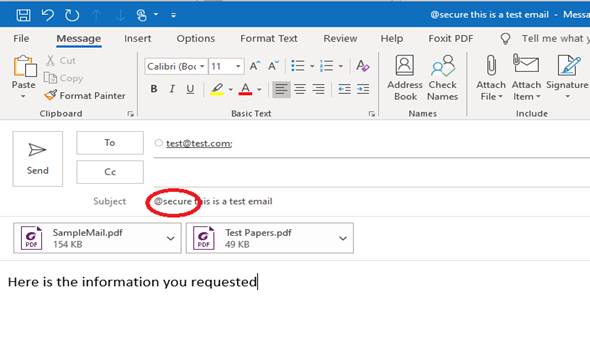
Our Outlook email servers will take care of the rest of the process and ensure that when the email is received, the transfer is done using a secure process.
Sending a secure email through UCMS-Family & Criminal
The email process which is built into UCMS-Family & Criminal allows emails to be sent securely and uses the same mechanism.
Recipients receiving a secure email from the courts
The recipient(s) of the email will receive an email that directs them to read the message from outlook.com. They can access this site through various mechanisms that prove that they are the intended recipient of the message. This could mean that the recipient enters their Google, Yahoo or Outlook account password when accessing the site or they can use a “one-time” passcode.
When going through this process for the first time, the recipient can also setup their devices (PC, laptop, Phone, Tablet), to trust the outlook.com servers. This means that they will only have to login to the outlook.com portal once or, if they used the “one-time” passcode method, once every 12 hours.